A health identity that makes check-in easier, connecting verified patient details, insurance and care-network access.
Make it simpler for patients to check in and connect with their healthcare network while keeping sensitive information understandable and controlled.
Patients need a clear health identity they can understand and share when care begins.
“A health identity that makes check-in less of a chore.
Smart Health is an iOS concept for helping patients keep their identity, insurance, records and care network in one place. I designed it at Truminds for a US healthcare client in 2023.
Product Designer · Truminds · Healthcare / MedTech · 2023
The brief: reduce the repeat work around care
Healthcare information often lives in forms, portals and conversations that do not connect. The project focused on a simpler patient-facing layer: one place to store health details, check in, share verified information and contact a care network.
The design needed to balance privacy with clarity. A patient should be able to understand their information and use it at the point of care without learning a new clinical system.
A check-in flow that starts with what patients already have
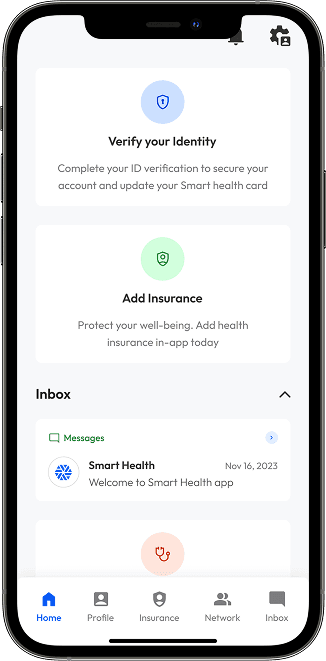
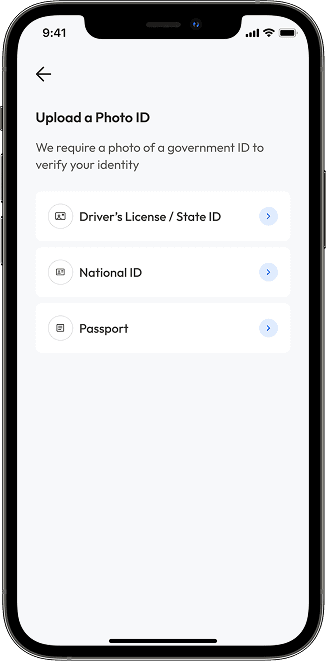
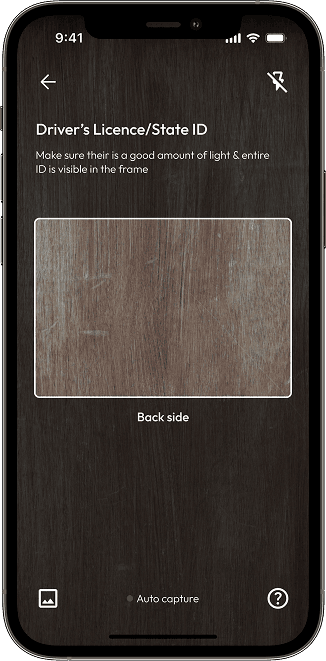
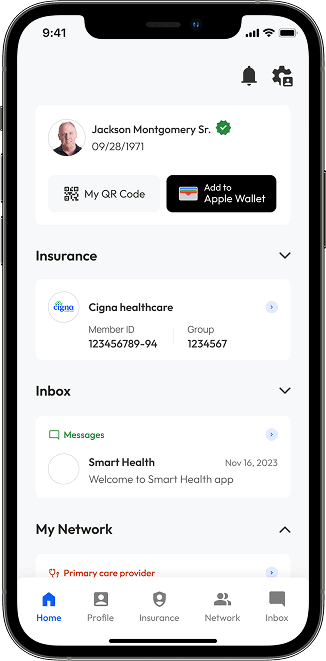
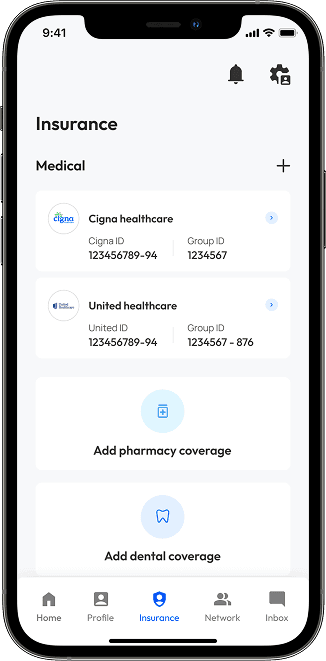
The concept used a short identity flow before making insurance and health details available. Each screen kept the next action explicit: start from the home view, verify identity, capture the ID, confirm the result, then access the insurance card.
Research made the information architecture concrete
Research into US healthcare workflows and conversations with subject-matter experts clarified the essential jobs: check in for a visit, find insurance, understand a health summary, keep track of medication and contact the right person.
The resulting navigation had five consistent destinations: Home, Profile, Insurance, Network and Inbox. The structure was designed around patient questions rather than the organisation that supplied the data.
Designing for trust at every step
Healthcare information needs confidence before it needs density. The interface made verification status visible, used plain-language summaries before technical detail, and kept the insurance card close to hand.
For people managing appointments, medication or care for a family member, that meant fewer hidden actions and fewer moments where the interface assumed specialist knowledge.
Keep account tasks close to the patient record
The account area brought messages, privacy controls, security settings and the shareable health card into the same navigation model. This gave patients a predictable place to manage their information after initial setup.
From design system to handover
I worked across the end-to-end product design process: healthcare research, information architecture, rapid prototyping, iOS interface design, UX and UI audit, stakeholder reviews and developer handover.
The final handover covered the main flows, core screen states, edge cases and implementation notes for identity verification and information sharing.
What the MVP delivered
- A single patient identity for records, insurance and care details
- A clearer route from check-in to verified information sharing
- Secure messaging and connection points for a care network
- Plain-language health information designed for everyday use
The design was fully completed and handed over. The client later delayed launch, so this case study presents the delivered product-design work rather than live adoption claims.
What I learned
- Domain knowledge is a design tool. Understanding the vocabulary, trust model and workflow prevents elegant but unusable solutions.
- Trust has to be visible. Verification, privacy and control need clear interaction states, not just policy text.
- Simplicity is an active design decision. A focused home screen and direct check-in path reduce anxiety in a high-stakes context.